
Apple Watch nap tracking: what it records and misses
Apple Watch can log naps outside your sleep schedule, with limits. What Apple's docs say it saves, where naps show up in Health, and how to set it up.
By the SmartNap team · · 8 min read
Apple Watch can record a nap, with limits. With Sleep Tracking on and watchOS 11 or later, it also tracks sleep outside your sleep schedule, including “short sleep sessions that might represent naps”, but Apple’s own technical paper says a session with one to three hours of sleep is saved only as asleep or awake, and sleep stages are saved only when a session has more than three hours of sleep. Apple’s documentation doesn’t say what happens to a 20- or 30-minute nap, and its alarm and timer guides describe only alarms set for a clock time and timers you start yourself.
Checked against Apple’s support pages (watchOS 27) and that paper on 21 November 2026.
Find your situation
- You want a straight answer on naps: what Apple says
- You want the watch to log your naps: setup steps
- A nap is missing from the Health app: what to check
- You want the alarm to count from when you fall asleep: how SmartNap does it
Does Apple Watch record naps? What Apple says
Apple’s Sleep feature is set up from the Health app on iPhone, where you choose a sleep goal, bedtime and wake-up times, Sleep Focus and Track Sleep with Apple Watch (Apple Support). When Sleep Tracking is on, “your Apple Watch tracks your sleep and adds sleep data to the Health app on your iPhone” (Apple Watch User Guide). Apple also asks you to charge the watch to at least 30% before bed and to wear it to sleep for at least one hour (Apple Support).
Apple’s support pages never use the word “nap”. Apple addresses naps in its paper Estimating Sleep Stages from Apple Watch, updated in October 2025 and linked from the support article. Its appendix says iOS 18 and watchOS 11 extended sleep tracking beyond a set sleep schedule, to people without a schedule and to sleep outside the main session, “for example, short sleep sessions that might represent naps”. Apple says it built this with training data from people on nontraditional schedules, such as shift workers and frequent nappers (Apple, 2025).
The same paper sets the limits:
- A session with one to three hours of total sleep is written to Health as asleep or awake only.
- Full sleep stages (Awake, REM, Core and Deep) are written only when a session has more than three hours of sleep.
- The paper doesn’t describe sessions with less than an hour of sleep, so Apple’s documentation doesn’t say whether a 20- or 30-minute nap is saved.
The sleep score is built around nights. Apple says it arrives “every morning after you wake up”, based on your previous night’s sleep, scoring duration, bedtime consistency over the last 13 nights and interruptions (Apple Support). Apple’s documentation doesn’t say whether naps count toward it.
What Apple Watch records and what it doesn’t
Per Apple’s documentation:
| Situation | What Apple’s documentation says |
|---|---|
| Sleep while Sleep Tracking is on | Recorded and added to the Health app (guide) |
| Sleep outside a sleep schedule, including possible naps | Recorded since iOS 18 and watchOS 11 (paper) |
| A session with 1 to 3 hours of sleep | Saved as asleep or awake, with no stages (paper) |
| A session with more than 3 hours of sleep | Saved with Awake, REM, Core and Deep (paper) |
| A session with less than 1 hour of sleep | Not described; Apple asks you to wear the watch to sleep for at least 1 hour (support) |
| Sleep score for a nap | Not described; the score is based on the previous night (support) |
| The watch battery runs out | Sleep isn’t tracked (support) |
| An alarm that waits until you fall asleep | Not described; alarms ring at a set time and timers start when you tap Start (alarms, timers) |
Where your nap data shows up
On iPhone, open the Health app, tap Browse, then tap Sleep (Apple Watch User Guide). Apple lists what you can see there: Stages (time and percentage Awake, REM, Core or Deep), Amounts (time asleep against your sleep goal) and Comparisons (heart rate and respiratory rate against your time asleep), with daily, weekly, monthly and six-month views (Apple Support). Going by the paper, a nap saved without stages shows no stage breakdown.
On Apple Watch, the Sleep app shows your sleep score, time in each stage, the amount of sleep you got “the night before” and your 14-day average (Apple Watch User Guide), so the Health app is the better place to look for a daytime session.
How to set up Apple Watch for naps
Apple doesn’t document a nap mode, so this is the standard Sleep setup plus a wake-up you set yourself, with menu names as Apple writes them.
- Turn on Sleep Tracking. On Apple Watch, open the Settings app, tap Sleep, then turn on Sleep Tracking. On iPhone, it’s in the Apple Watch app under My Watch > Sleep (Apple Watch User Guide). If you’ve never set up Sleep, start in the Health app: tap Browse, tap Sleep, tap Sleep again, then tap Get Started below Set Up Sleep. If you don’t want a recurring schedule, the Sleep app on the watch offers Delete Schedule during setup (Apple Support).
- Charge first. Apple asks for at least 30% charge before you sleep and says a watch with a dead battery won’t track sleep (Apple Support).
- Wear it snug but comfortable. If the watch is too loose, Apple says the accelerometer might register too much movement (Apple Support).
- Quiet the watch if you want. You can control Sleep Focus manually from Control Center (Apple Watch User Guide), and Apple says Sleep Focus turns off the watch display and limits distractions (Apple Support). Apple doesn’t say whether Sleep Focus changes how a nap is recorded.
- Set your own wake-up. For a set length, open the Timers app, scroll down, tap the Add button, set hours and minutes with the Digital Crown, then tap Start (Apple Support). For a clock time, open the Alarms app, tap the Add button and set the time. In the alarm’s options you can turn off Snooze, turn on Break Through Silent Mode so the sound always plays, or turn on Silent Mode for a tap on the wrist with no sound (Apple Support).
- Check the Health app afterwards. Tap Browse, then Sleep.
Both the timer and the alarm count from when you set them, not from when you fall asleep. If you take 15 minutes to drift off, a 30-minute timer leaves you about 15 minutes of sleep.
However you wake up, you may feel groggy for a while. Researchers call this sleep inertia: a 2019 review describes it as the grogginess felt on waking, with the strongest effects in the first 30 minutes or so (Hilditch and McHill, 2019).
If a nap doesn’t show up in the Health app
- Check the basics. Sleep Tracking must be on, and the battery must last (Apple Support).
- Check the length. Apple’s paper only describes sessions with at least an hour of sleep.
- Add it by hand. Apple says sleep data can also be added manually. In the Health app, tap Browse, tap Sleep, tap Sleep again, then tap the Add button (iPhone User Guide).
What third-party apps can add
The Health app gathers data from iPhone, Apple Watch “and apps that you already use”, and you choose what each app may use: in the Health app, tap the Summary tab, tap your profile picture, then under Privacy tap Apps. Apple adds that Apple Watch apps can also read and write Health data (Apple Support).
The built-in tools give you a sleep record and a fixed alarm or timer. A nap app can add what Apple’s guides don’t describe, such as a timer that waits until you’re probably asleep, a hard latest wake-up time and a nap-by-nap history.
How SmartNap handles naps
SmartNap is an iPhone app with an Apple Watch app, built for that gap: it counts your nap from when you probably fell asleep instead of from when you lay down.
You set two things: a nap length, or one of six presets (Power 20 min, Focus 30 min, Flow 45 min, Balance 1 h, Deep 1 h 30 min, Recovery 2 h), and a latest wake-up time. With a paired Apple Watch, the app estimates when you fall asleep. It sets a heart-rate baseline near the start, then looks for changes in heart rate, heart-rate variability and movement. Once it estimates you’re asleep, it starts timing. The first alarm rings at whichever comes first: your nap length counted from that estimated moment, or your cutoff. Without a watch, you start the timer yourself on iPhone.
Example: you lie down at 2:30 pm for a 30-minute nap with a 3:30 pm cutoff. If the watch estimates you fell asleep at 2:50, the alarm rings at 3:20. If it estimates 3:10, the cutoff comes first and the alarm rings at 3:30. The estimate can be early or late; the cutoff is the part you set for sure.
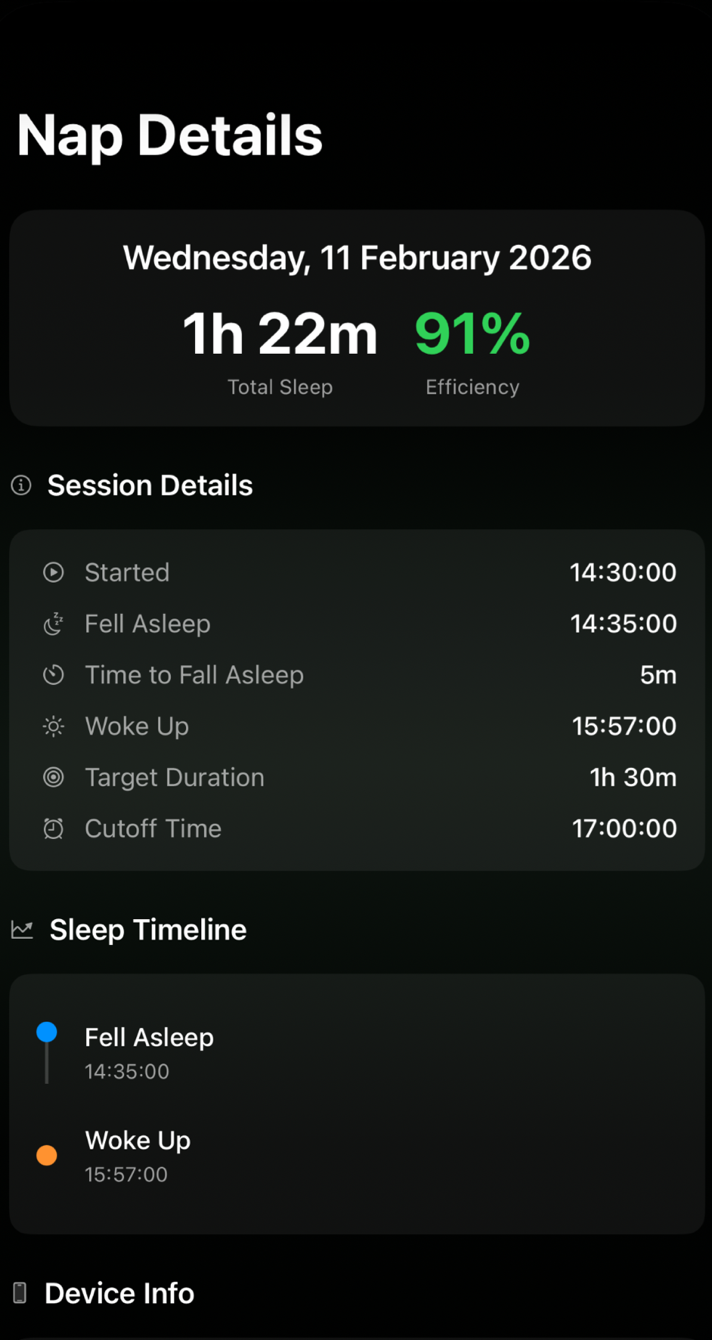
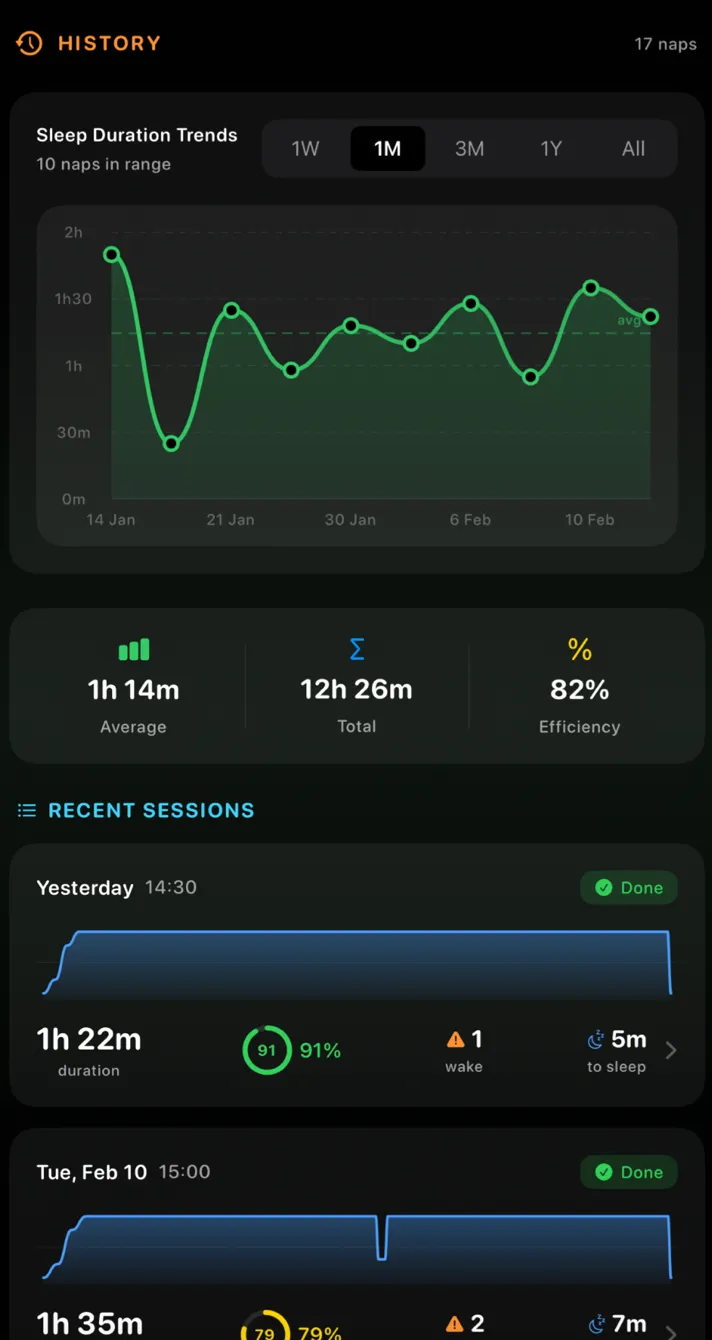
Each nap is saved with its start, estimated time asleep, time to fall asleep, wake time, target, cutoff and an estimated sleep efficiency, and the history is charted over weeks.
SmartNap reads heart rate and heart-rate variability from Apple Health and movement from Apple Watch, and the readings are processed on your iPhone and watch. It needs iOS 26 or later, and watchOS 26 or later for the automatic estimate. Your first nap is free; after that, naps need SmartNap Pro.
Questions
Does Apple Watch track naps automatically?
With Sleep Tracking turned on, Apple says watchOS 11 and later can track sleep outside your sleep schedule, including short sessions that might be naps. A session with one to three hours of sleep is saved as asleep or awake only. Apple's documentation doesn't describe sessions with less than an hour of sleep.
Why didn't my nap show up in the Health app?
Check that Sleep Tracking is on and that the watch was charged and worn snugly. Apple's paper only describes sessions with at least an hour of sleep. You can add a nap by hand in the Health app: tap Browse, tap Sleep, tap Sleep again, then tap the Add button.
Do naps count toward the Apple Watch sleep score?
Apple says the sleep score arrives every morning and is based on your previous night's sleep. Its documentation doesn't say whether naps are included.
Do I need a sleep schedule for Apple Watch to record a nap?
No schedule is required, according to Apple's paper: since watchOS 11, tracking also covers people without a sleep schedule and sleep outside it. Sleep Tracking still has to be turned on.
Can Apple Watch wake me up after a nap?
Yes. Use the Timers app for a set length or the Alarms app for a clock time. Both count from the moment you set them, not from when you fall asleep.
Sources
- Estimating Sleep Stages from Apple Watch (updated October 2025). Apple, 2025.
- Track your sleep on Apple Watch and use Sleep on iPhone. Apple Support, 2026.
- Track your sleep on Apple Watch (Apple Watch User Guide, watchOS 27). Apple Support, 2026.
- Set up sleep schedules on Apple Watch. Apple Support, 2026.
- View your sleep history in Health on iPhone. Apple Support, 2026.
- Set timers on Apple Watch. Apple Support, 2026.
- Add an alarm on Apple Watch. Apple Support, 2026.
- Use the Health app on your iPhone or iPad. Apple Support, 2026.
- Sleep inertia: current insights (Hilditch and McHill). Nature and Science of Sleep, 2019.
This guide is general information, not medical advice. SmartNap is a wellbeing app, not a medical device. If you’re often very sleepy during the day, talk to a doctor.
Written with AI assistance, checked against the sources listed, and published under the editorial responsibility of Sources Knight LLC.